The music. The lineup. One place.

Walk-up songs and lineups for youth baseball

Coaches build the lineup. Parents run the music. Leadoff keeps the dugout and the stands on the same page.

Parents run the music. Coaches build the lineup. Same team, same page.
4.8 on the App Store

See it in action

Build the lineup, print or share it, then play the walk-ups.

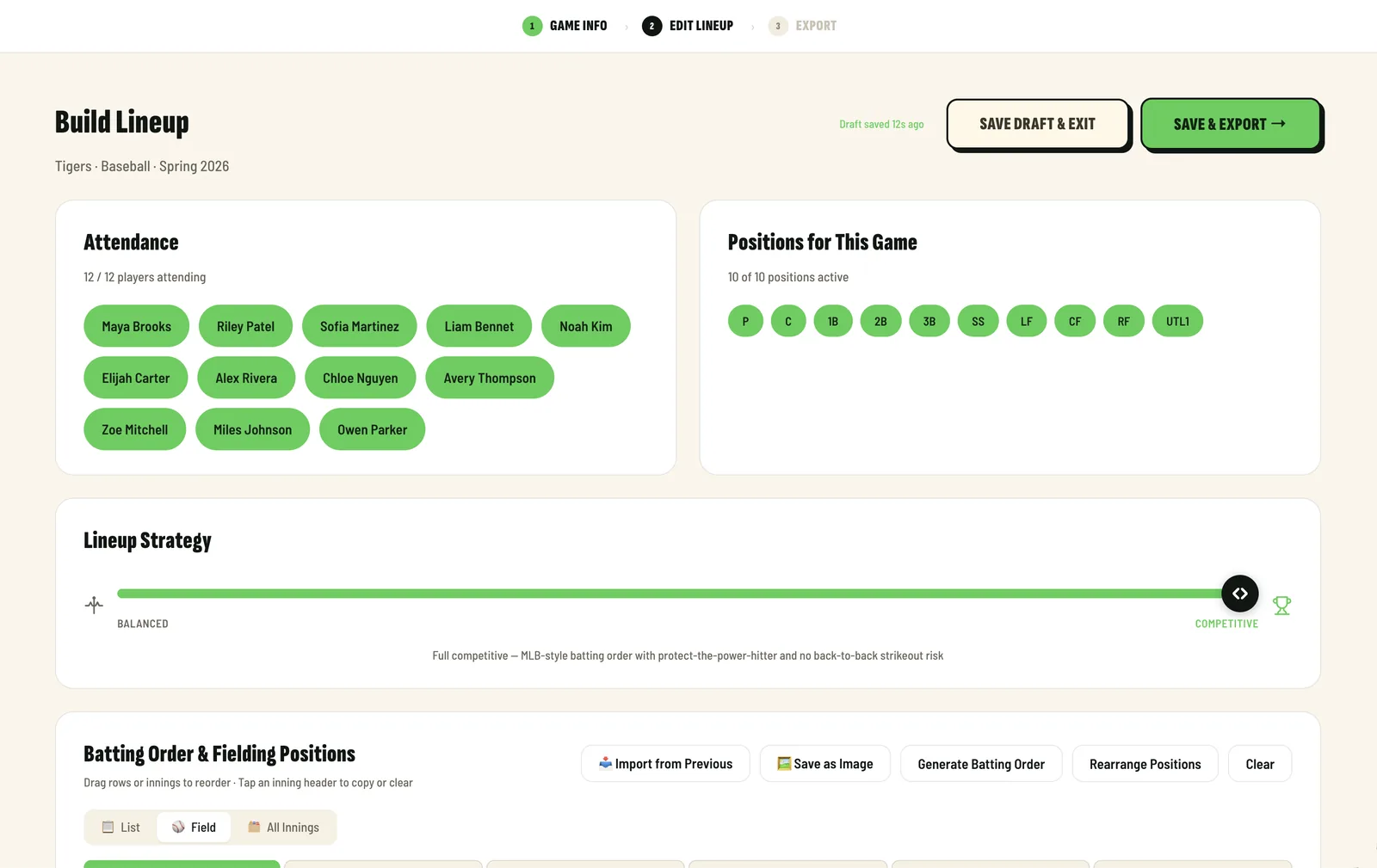
  1. Leadoff lineup builder: Maya Brooks bats first, with fielding positions and bench turns for each inning
    Step 1

    Build the lineup

    Batting order, positions and bench turns for every inning.
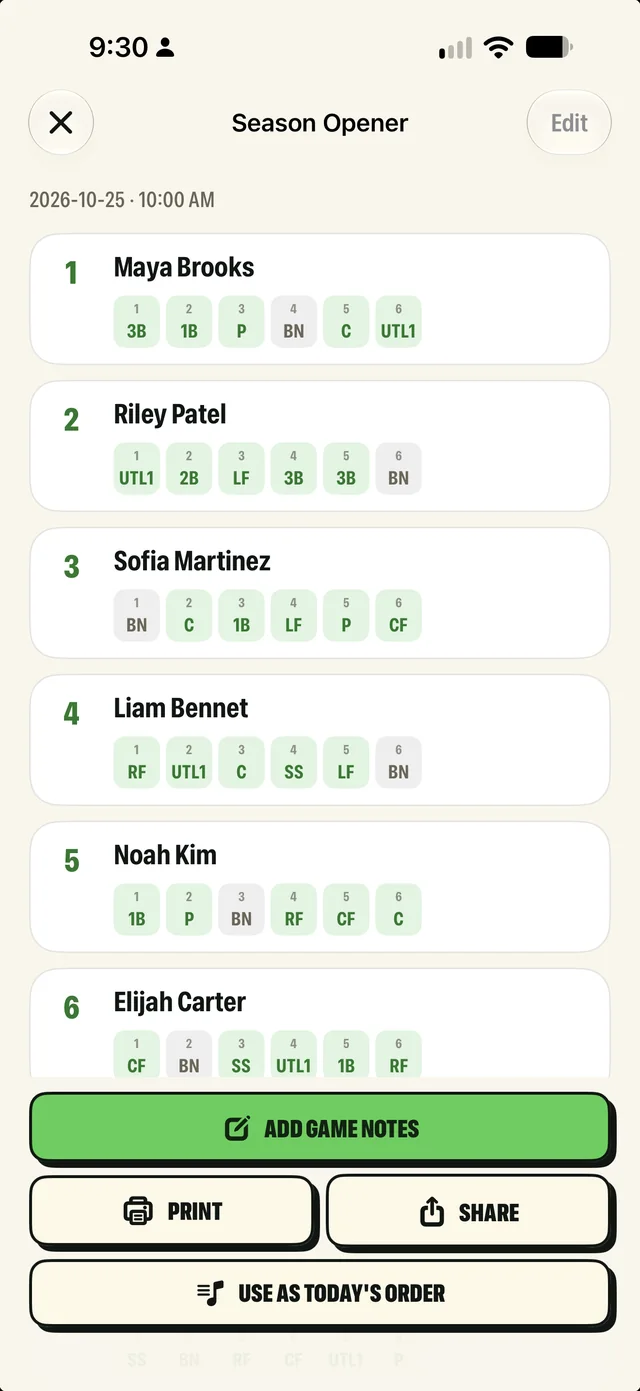
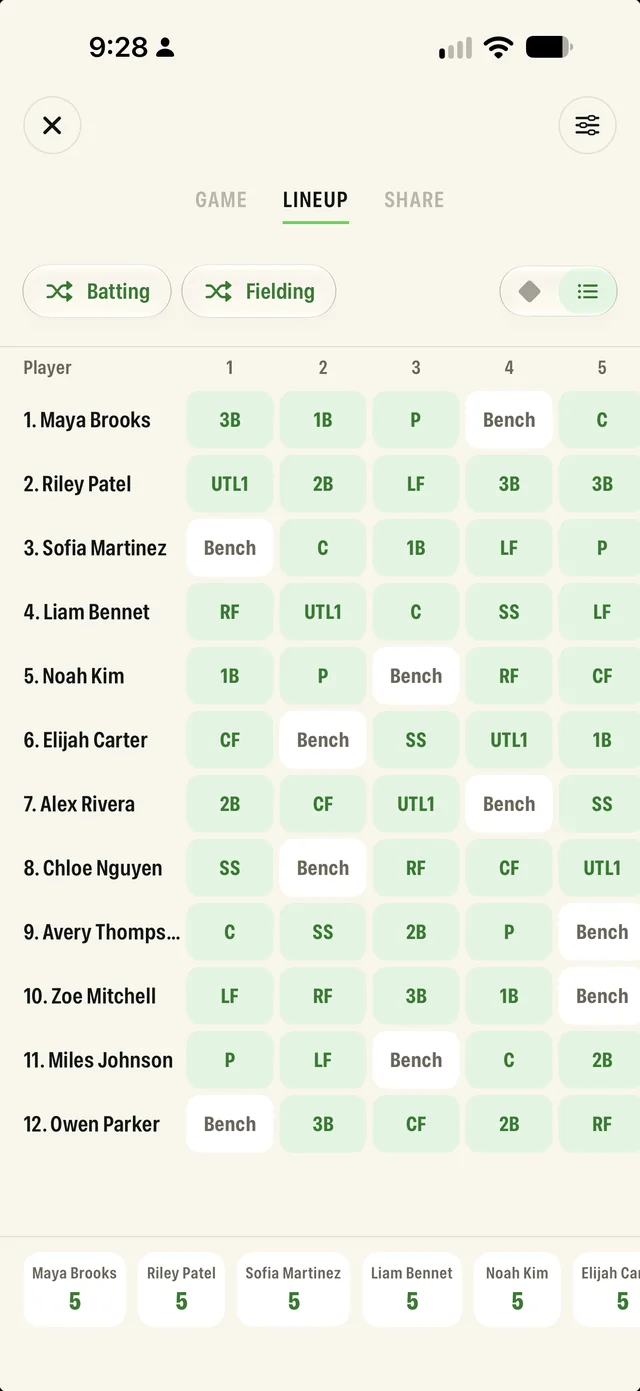
  2. Saved Season Opener lineup with each player's position by inning, plus Add game notes, Print, Share and Use as Today's Order
    Step 2

    Print or share it

    Print the card for the dugout or share it with the team.

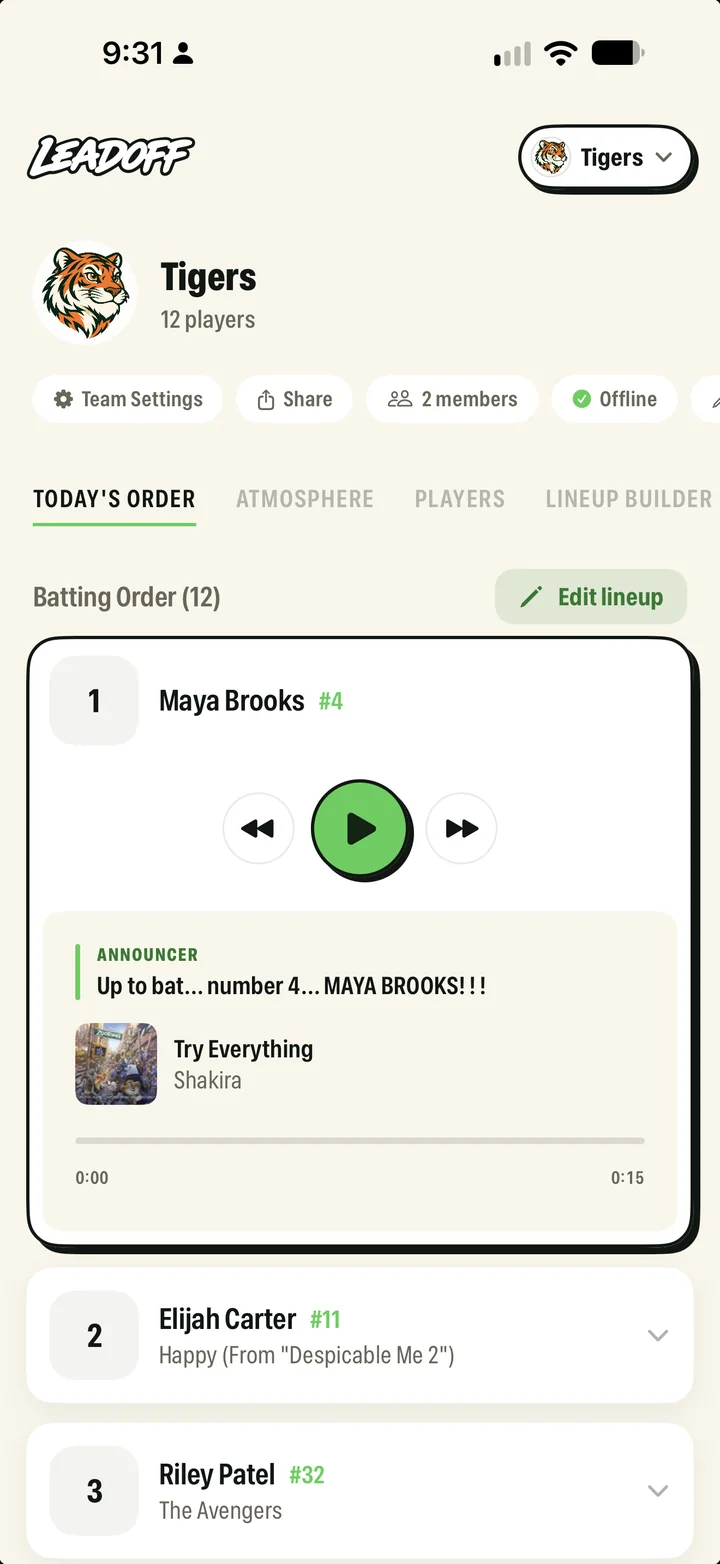
  3. Today's Order on a parent's phone: Maya Brooks up first with play controls, the announcer line and her walk-up song
    Step 3

    Play the walk-ups

    Each batter's intro and song, right from the stands.

For coaches

Build lineups on the web and iOS

One lineup, everywhere. Build it on a laptop or in the app and it's the same batting order and the same positions, on every phone on the team.

app.getleadoff.com
Leadoff web lineup builder with attendance, positions for this game and lineup strategy
The same lineup in the Leadoff iOS app: Maya Brooks bats first, with positions and bench turns for each inning
For the parent DJ

Walk-up intros that never sound the same twice

Every kid gets called like a big leaguer, and the announcer doesn't read the same line all game.

Maya Brooks#4
At-bat

Now batting...

Number 4...

Maya Brooks!

Mix it up

Turn it on and each kid gets three takes that rotate, so every at-bat sounds a little different.

Say it your way

Record the intro in your own words. Leadoff writes down what you said, and the announcer performs it with your energy. Or keep your own voice on it.

Write your own

Type any line you want: a nickname, a hometown, a little hype. The announcer reads it like it's the big leagues.

Pick the announcer

Six voices, from Frank's gravel to Jada's broadcast polish, plus Tony, Carlos and Tyler in Spanish. Ten intro styles to start from.

Time the drop

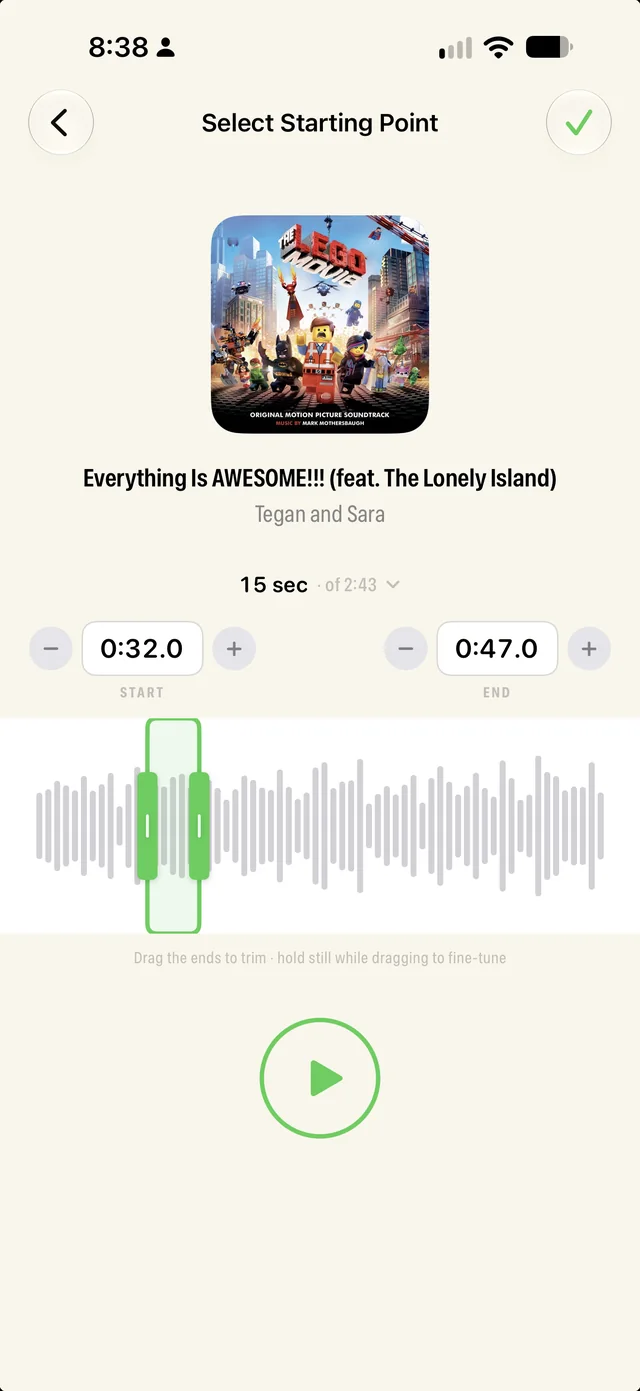
Trim the song to the best 15 seconds, then choose when it hits: before the announcer, under them, or right after.

Get the app
From the field
Five stars
Easy to use, simplified, no extra purchases needed!!!

"Set your team, create your intro, add song and timeline details, and you're good to go! You can easily drag your team to the lineup needed without any headaches! But the most impressive, the support!!! I emailed them an issue we encountered and literally within a day or two, they had it fixed!"

— gtegjysy · App Store
Five stars
So Fun and Special

"The kids absolutely love hearing their name and music when they come up to bat! It really adds a fun, big-league feel to the games and gets the players and crowd excited. Perfect for coaches or parents who want to make game day more memorable!"

— Team Forest · App Store
Five stars
10/10

"We're loving this app so far, and you don't have to pay for the announcer voices!! The lineup downloads to your phone so you can have it even if you're out of service. Love. 10/10"

— Diondrajean · App Store
Five stars
So easy and reasonable pricing

"I tried another app first based on all the recommendations I had gotten, but this one is so much easier and more reasonably priced. I am very, very happy with it and how easy it is to use."

— Just got my iphone · App Store

Frequently asked questions

Something else? Email hello@getleadoff.com.

Do I need an Apple Music subscription for Leadoff to work?
Yes. Leadoff uses Apple Music to search for and play walk-up songs. An active Apple Music subscription, including the free trial, is required to add and play songs during games.
Do all parents need to pay for Leadoff?
No. Only one person on the team needs a paid Leadoff subscription to play the walk-ups during games. Parents can join the team and set up their player's walk-up song and introduction for free.
Can parents add their player's walk-up song themselves?
Yes. Coaches can share their team with parents using a simple invite code. Each parent can then add their player's walk-up song and introduction so the lineup stays updated automatically.
What sports is Leadoff best for?
Leadoff is designed primarily for youth baseball and softball teams, including Little League, travel ball, coach pitch, and tee-ball. Any sport that uses player introductions or walk-up music can also use Leadoff.
How do walk-up songs work in youth baseball?
Walk-up songs are short clips of music that play when a player walks up to bat. With Leadoff, coaches can assign a walk-up song to each player and trigger the music instantly during the game.
Can I choose the exact part of the walk-up song that plays?
Yes. Leadoff lets you trim the exact moment of a song so players hear their favorite part when they walk up to the plate.
Does Leadoff include player introductions?
Yes. Leadoff includes announcer-style player introductions that play before the walk-up song, making every at-bat feel like a big-league moment for youth players.
Can Leadoff run the full batting lineup during a game?
Yes. Coaches can run the entire lineup from the app, trigger player introductions, and play walk-up music for each batter throughout the game.
How do I move a player to the bench?
Go to your Team and find the player in your lineup.
  1. Swipe left on the player's row.
  2. Tap "Bench" to move them to the bench.
To move them back into the lineup, find the player on the bench, swipe left on their row, and tap "Active."
Why isn't my player's song playing?
Leadoff requires an active Apple Music subscription to play songs.
  1. Make sure you're logged into Apple Music on your device.
  2. Confirm you have an active subscription or free trial.
  3. Try playing the song directly in Apple Music to verify it works.
  4. If needed, go to Settings in Leadoff and tap "Restore Purchases."